
The car rental industry is constantly on the move. Customers expect speed and convenience, while rental companies have to find the balance between efficiency and control. In the previous blog we explained the differences between real-time and non-real-time car rental.
There are many advantages to real-time rental. Online bookings are processed directly into a reservation, so the customer has immediate certainty and no-shows are less frequent. You also avoid manual errors when re-keying reservations. Not a single one is ever missed again. Finally, only with real-time rental can you use dynamic pricing to steer your utilisation rate towards an optimum.
Yet many rental companies still opt for non-real-time rental. Sometimes that is down to the technical implementation costs of connecting software and website, but there are other objections too:
- You miss out on customers because the full range is not shown;
- You have less flexibility to plan yourself, which negatively affects the utilisation rate;
- You miss out on customers who are looking for a 'tailored quote'
- You cannot screen customers properly in advance, which exposes you to more risk from dubious renters.
These are legitimate objections for choosing non-real-time rental.
There is, however, a 'best of both worlds' scenario. In this blog we explain how you can apply our software so that you always have the best combination of control and automation. That way you can always deliver great service to every customer.
Starting point: real-time rental
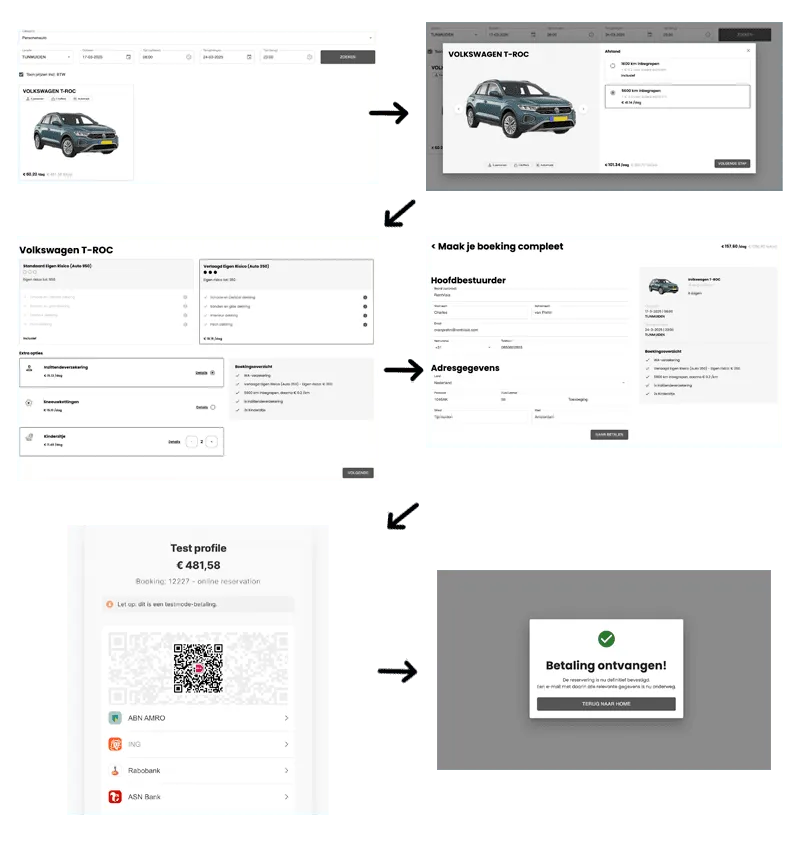
For the 'best of both worlds' principle, we take real-time rental as the starting point. In other words: only the actually available range is shown on the website.
The screenshots below give a good example of this.
Exit 1: Show all availability
One of the most frequently heard objections to real-time rental is that the rental company fears customers will not book because the full range is not shown. In some cases the range does become very limited indeed. That is when the rental company is almost sold out. This problem also arises for rental periods further in the future. In many cases it is possible to hire in vehicles, which means you want to rent out more than you currently have available.
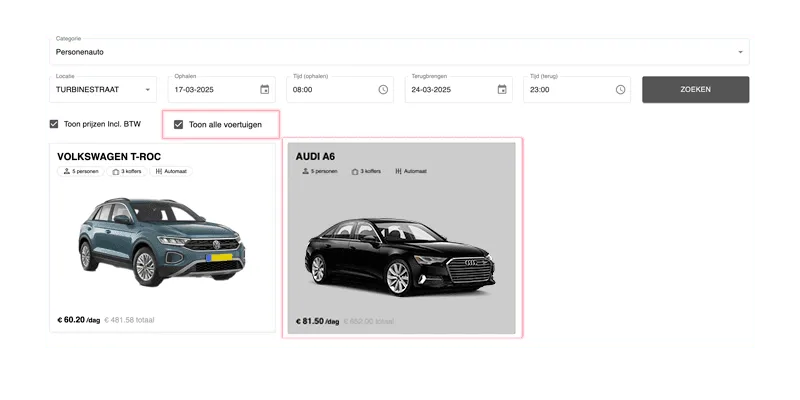
To tackle this problem, we first add a button to the booking process. The so-called 'Show all' button.
This gives the customer the flexibility to also view the range that is not currently available and then express their interest by submitting a reservation request for the vehicles that are not currently available.
This basically solves the problem, but at the same time it creates two new risks:
- For short-notice bookings, it is often not possible to fulfil the requests. You then still lose (a lot of) time turning the customer down; and (following on from that)
- You give the customer choice stress by showing an unjustifiably large range.
We cover the solution to risk 1 in the next section. A little teaser: we do that with a pooling/overbooking system.
We solve risk 2 by only offering the full range by default for bookings more than 2 weeks ahead. In that case there is still plenty of time to hire in vehicles.
Exit 2: Pooling and overbookings
With the introduction of the 'Show the full range' button, we reintroduce manual work for the rental staff. That, however, is at odds with the starting point of real-time rental, in which we aim for minimal time investment from the rental team.
We are therefore going to turn part of the unavailable range into actually available. We do this with a pooling and overbooking system.
The idea behind it is simple. You use availability from another (more luxurious) class to top up demand for the often popular cheaper class. To the customer it then appears that the cheaper class is still available.
An example:
For convenience, let's talk about an economy-class and a comfort-class vehicle. You have no vehicles left in the economy class, but people keep asking for it. By pooling the economy class with (part of) the comfort class, you keep showing the economy class as available to the renter.
A small warning. The overbooking and pooling system does not work well for all types of vehicle. It is, for example, very suitable for passenger cars, but less suitable for vans or refrigerated vans.
Exit 3: Request a quote
Some renters have specific wishes or need a little personal attention in order to rent. This type of renter is really looking for a tailored quote. With real-time rental, however, the starting point is that you only have contact with your customer via the website.
The solution to this problem is simple and is already widely used in the lease and dealer market.
In the rental process you add a button to the vehicle class: 'Request a quote'. The prospective renter leaves their name, e-mail, phone number and a short note with their wishes. The quote request lands in your rental system to be followed up by a member of staff.
This gives customers the opportunity to negotiate or come up with special requests. This enhances the customer experience and builds confidence that your company thinks along with the customer. For you, this is a good option to sort on-request rentals more easily and to deploy an optimal combination of real-time and non-real-time.
We do not, however, recommend always showing the quote button. You may well ask whether it makes sense to invest time and effort in quote requests for today or tomorrow.
Exit 4. Online screening of customers
The last objection we often hear is that you cannot screen customers properly in advance, which exposes you to more risk from dubious renters. Rental companies want a certain degree of control over who rents the vehicles. That makes sense, because vehicles are not cheap toys.
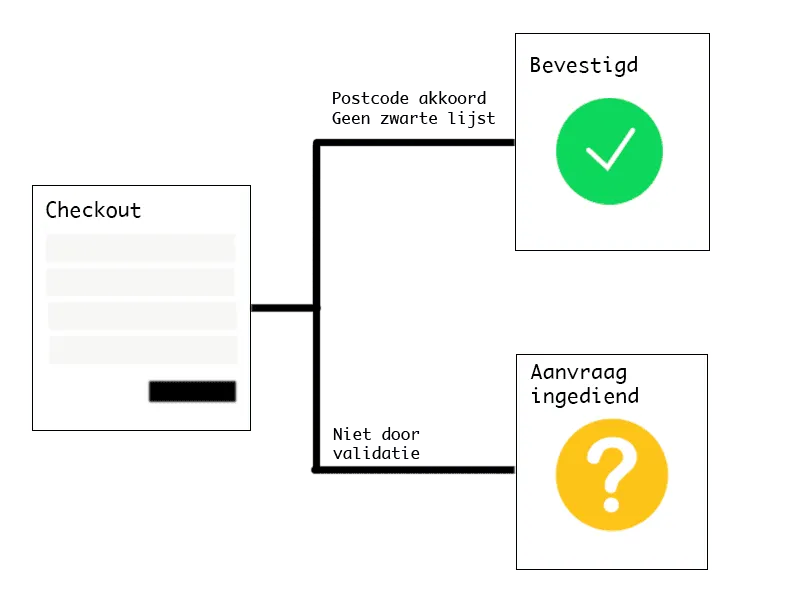
If we zoom in on how that screening process works, there are often a number of 'red flags' on the basis of which a rental request is not processed:
- Someone lives in Groningen but wants to rent a vehicle in Limburg;
- Someone comes from a postcode area known for dubious renters;
- The renter is on a blacklist.
These 3 points, however, are very easy to screen online too. First, you can add a whitelisted postcode area (e.g. a 50km radius), so that everything outside that postcode area is treated as a reservation request. In addition, you can blacklist certain postcode areas, so that those areas also come in as reservation requests. Finally, you can have the Elena/Crimimail checks take place online. If the renter is on a blacklist, the reservation is likewise treated as a request, with a warning attached.
In this way you can give yourself as much assurance as possible that you are bringing in reliable customers who cause as little damage as possible. That means more certainty and confidence from your side towards the customer.
Conclusion: real-time and non-real-time rental
In the blog above we have described how you can incorporate the advantages of traditional on-request rental into the fully automated real-time rental principle. The result is that you can serve a considerably larger share of your customers, while keeping the extra work for staff to a minimum.
We want to stress that every rental organisation is different. The above is only a general description of how you can set up your processes. Do not adopt it blindly, but consider whether everything also applies to your organisation.
We are happy to help with this. In an exploratory conversation we discuss your challenges and look together at which software solution best suits your company.
Already interested in real-time car rental, or still have questions? Get in touch with us via the button below.
Schedule a meeting.