
No longer happy with your current software supplier, or do you simply want to improve your business processes with (better) car rental software? Then this Ultimate Guide to good car rental software is for you.
In part 1 we set out all the must-have criteria of good car rental software. We go beyond the content alone. The technical aspects are covered too. In part 2 and the parts that follow, we take a closer look at specific processes that good car rental software needs to take into account.
This Ultimate Guide to good car rental software is written for car rental companies that want to improve their software processes. If you are looking for a copy of your current car rental software with a few improvements here and there, this article is not for you.
In this Ultimate Guide to good car rental software we therefore only cover the features that are relevant to almost every car rental company. That means we leave aside the so-called 'nitty-gritty' functionality that may add something for some rental companies, but is not essential for running the business well.
What good car rental software must deliver (minimum functional requirements)
“Good car rental software enables you to run the core processes of your business flawlessly and to improve them.”
Core processes of car rental
Good car rental software should focus primarily on the core processes. No surprise there, of course, but let's briefly consider what the core processes of a car rental company actually consist of:
- Configuration: setting up vehicle classes, vehicles, prices, deposits and extras;
- ** Rental operations:** handing out and taking back vehicles;
- Vehicle & customer management: registering and maintaining vehicles and customers;
- Finance: invoicing and managing creditors, paying debtors.
Functions required for the core processes Now that we have looked at the core processes, it is time to dig deeper. For each core process we set out below the accompanying micro-processes that the car rental software must include.
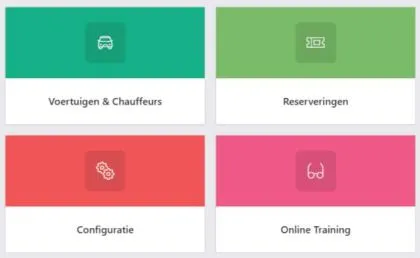
Configuring car rental software
Almost every car rental company starts with the question of what the planning board will look like. Understandable from a front-desk employee's point of view, but from a management perspective this should not be the first question.
After all, the planning board can look as good as it likes: if the car rental software cannot be configured to fit your business, then by definition the software is not suitable.
Creating vehicle classes
Good car rental software uses vehicle classes to calculate availability and the prices to apply. The specific vehicles themselves sit under a vehicle class.
When creating vehicle classes, you should at the very least be able to enter the following options for full flexibility:
- The branch the vehicle class belongs to. This is especially relevant if you want to run several types of business (budget and premium) in the rental software.
- A code to identify the vehicle class.
- A description to describe the vehicle class.
- Vehicle category (e.g. van, passenger car and refrigerated van). This is needed to organise vehicle classes simply and filter them easily;
- Pricing method: do you price per 24 hours or per calendar day? By selecting this method at vehicle-class level, you can differentiate per vehicle class.
- Overbooking class: although this is not really a must-have for most rental companies, the presence of this option shows how future-proof the rental software is. The option is intended to move any overbookings automatically to another vehicle class, so that you can sell optimally.
- Extras: you must be able to attach separate extras to each vehicle class. It would be odd, after all, if customers could order a removal package when hiring a passenger car.
Creating vehicles
Vehicles that are created sit under a vehicle class. When creating a vehicle you enter the vehicle's characteristics, but also, for example, the purchase value, depreciation and (monthly) costs. This is essential for determining a vehicle's profitability.
Setting prices
The so-called 'pricing engine' is perhaps the most important part of rental software. Good rental software is built around the pricing engine, which gives you the flexibility to achieve the highest possible return (in line with the characteristics of your car rental business). Many rental systems have not built this the right way, because aspects such as dynamic pricing are bolted on at a later stage. This creates a serious risk of spaghetti code, which in turn affects the reliability and scalability of the rental package.
We believe dynamic pricing will become the norm in time. But if you do not (yet) consider it important, the minimum basis the car rental software must contain is as follows:
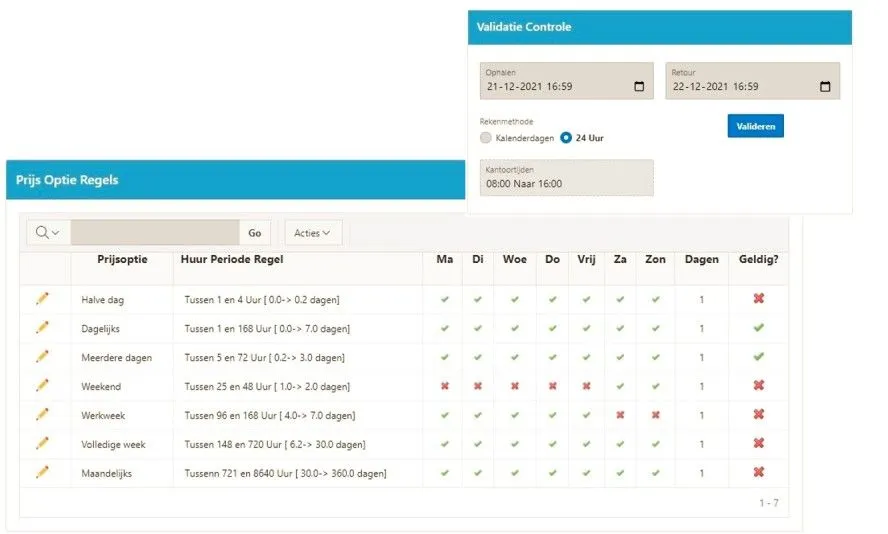
- Seasons: to differentiate prices per season / year. Rates should be easy to copy and adjust for the following season;
- Price per day (or part of a day): prices must be flexibly configurable per period. Renting for a day is generally more expensive than a working week or a full weekend.
Deposit
The ability to configure a deposit is equally essential. Good software offers the option of setting several types of deposit per vehicle class (high deposit, low deposit). These deposit types can then be linked to an extra (excess waiver).
Extras
We also call the extras (upsells) the cash cow of the rental business. Margins on extra kilometres, removal packages or passenger insurance are, after all, considerably higher than on the vehicle itself.
It is therefore essential that these extras can be linked properly per vehicle class and (perhaps) even per location. Also ask whether any thought has been given to tracking the availability of the extras.
Rental operations & the car rental system
Running rental operations: creating and managing a reservation
The most important feature of rental software is the ability to create and manage a reservation. The steps must be so simple that a reservation can be made within 2 minutes.
Based on feedback from dozens of car rental companies, we have arrived at the following (best practice) steps:
** Creating a reservation ** Step 1: Enter date and time; Step 2: Select an available vehicle with its price; Step 3: Add extras; Step 4: Enter basic customer details; Step 5: Confirm the reservation by e-mail, with or without automatically assigning a vehicle;
** Vehicle collection ** Step 1: Reminder to sell extras; Step 2: Complete the customer details; Step 3: Create a provisional invoice and handle payment; Step 4: Vehicle inspection (damage, fuel and mileage check)
** Vehicle return ** Step 1: Vehicle inspection (damage, fuel and mileage check); Step 2: Record any costs for fuel, AdBlue and damage; Step 3: Draw up the final invoice; Step 4: Any corrections to the final invoice (subsequent fines).
For short lease and lease, essentially the same steps apply, but with a few exceptions:
- when creating a reservation, in some cases only the collection date and time need to be entered;
- reservations can be extended (automatically);
- instalment invoicing happens automatically (in advance or in arrears).
Finally, good car rental software offers the ability to extend reservations easily and swap vehicles.
Overview of rental operations (planning board and dashboard)
A good rental company has an overview. Questions such as “How many cars do I need to rent out today?” and “Which cars do I still have available?” must be clear at a glance.
This can be done in two ways: 1) via the planning board (visual) and 2) in a dashboard. Both options should be available for full flexibility and overview.
** Planning board **
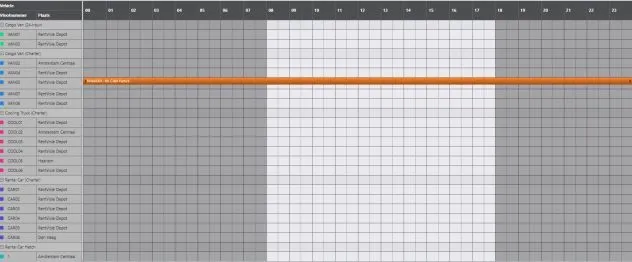
Since most people are visually minded, it is important that an overview is displayed visually in a so-called 'planning board'. In this planning board, reservations are shown per vehicle class with a different colour per status. Reservations can easily be viewed by clicking on them.
For a good overview, the planning board must be configurable in several ways, for example through filters on locations, categories, vehicle classes and vehicle characteristics. Day, week and month views are no unnecessary luxury either.
It is also common for reservations to be created directly from the planning board (drag & drop reservations) and for reservations to be viewed there.
Finally, the planning board should show which vehicles are currently in maintenance and whether a vehicle needs to be transported.
** Dashboard **
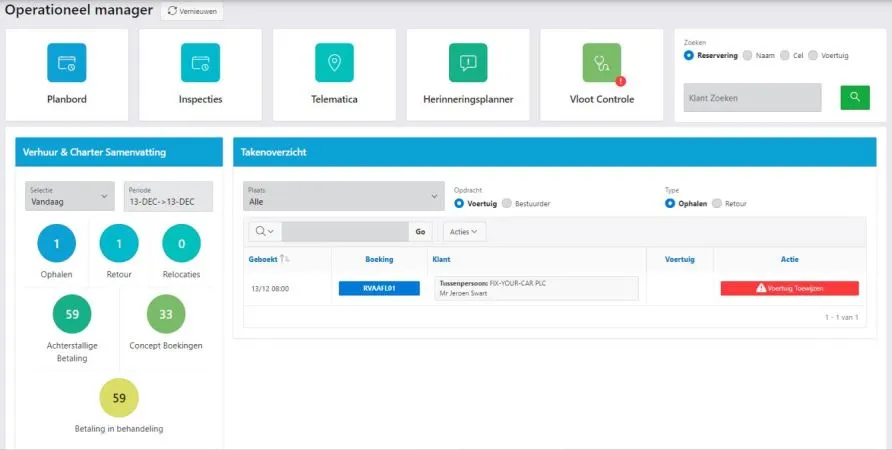
In addition to the planning board, the dashboard gives an overview of operational tasks. Here you can easily look up, for example, which vehicles are being collected today, which reservations still need a vehicle inspection, which people still have to return their vehicle and which reservations still have an outstanding payment.
Vehicle & customer management
Vehicle management
Good rental software also has a vehicle management module. Here you keep track of the vehicles' characteristics, register damage and, perhaps most importantly, record the costs associated with the vehicle. Think, for example, of road tax and lease costs. The latter is essential for ultimately calculating the return (ROI) on a vehicle.
Customer management
At least as important is managing your customers. It is vital that you can easily look up customers, track down customers with outstanding amounts and view a customer's reservation history.
Financial matters
Reservation-related financial matters must be possible in the car rental software. It does not matter whether the car rental software has its own accounting programme or is linked to external accounting software.
Many car rental companies, however, ask little or nothing about how financial matters are handled in the car rental software. Usually the questions are limited to: 'can I also invoice?' or 'do you have an accounting integration?'
Good questions in themselves, but you should be asking many more…
Our advice: make sure you ask about the ins and outs of the invoicing process and discuss them together with your finance department.
How exactly does invoicing work?
At the end of the reservation a final settlement (invoice) must be drawn up. This is mandatory for business customers, but private customers also like to have proof of payment.
A frequently asked question is how such an invoice issued before the reservation should be treated in the accounts. The answer depends on whether it concerns a short-term or long-term rental.
** Short-term rental **
Best practice for short-term rental agreements is to go by the moment of invoicing. An alternative (criticised in the Netherlands) is to go by the moment of payment.
However, that does not answer the question of what to do with the invoice issued before the reservation. Technically, you have to record this invoice in your accounts (= revenue). At the subsequent final settlement you then have to invoice any additional revenue separately.
The above is correct, but it also points to practical objections. After all, in that case at least two invoices are created for every short-term rental: 1) the invoice for the principal sum, and 2) subsequent costs such as extra kilometres and fuel.
Good rental software takes this into account. The invoice issued with the rental agreement is a so-called pro-forma invoice (provisional invoice). This is not recorded in the accounts. At the end of the rental agreement the final invoice is drawn up, which can be settled and reconciled directly against the (deposit) payment already received from the customer.
** Long-term rental **
With long-term rental it works differently. Here the starting point is that income should be recognised on the basis of the 'percentage of completion' method.
If, for example, you rent out your vehicle for a period of 4 years, you must recognise 25% of the total rental income as income each year. This becomes more complicated, however, if the rental period does not start on 1 January (assuming the financial year is the same as the calendar year).
To avoid making it needlessly complicated, and also to align with commercial practice, the rental software should allow monthly/quarterly invoicing. These invoices, paid or unpaid, should be recognised as income.
The alternative is to take the profit on completion of the contract, the 'completed contract method'. This is (sometimes) allowed commercially, but not for tax purposes. We will therefore not go into it further.
Disclaimer: the above outlines the main principles and does not address any exceptions.
Deposit
Dutch car rental companies often allow the deposit to be paid by debit card (PIN). This differs from, say, international car rental companies that only accept credit cards.
Good rental software should cater for both. In one of the following parts we look at how deposits are processed correctly in the accounting software, so that (batch) refunds become a piece of cake.

Technical aspects of car rental software
Besides the core functionality, it is worth paying attention to a number of technical aspects. Can the software be integrated, is it scalable and does it run in the cloud?
Integrations
In a rapidly digitising world it is essential that the car rental software can be integrated with other systems. Think of simple integrations such as the Elena check (blacklist) and an integration with the RDW (the Dutch vehicle authority), but also more complex integrations such as those with online brokers or with the dealer management system.
The minimum that car rental software must have today is an API. The API gives you the flexibility to connect everything in your reservation software to your website in real time. Not only do reservations then land directly in your reservation software, price adjustments and image changes are also applied directly on your website. On the one hand this saves an enormous amount of time and prevents errors; on the other hand it opens up new opportunities for optimising returns (for example through dynamic pricing).
Scalable
Another very important aspect of 'sustainable' car rental software is scalability. This is extremely difficult to judge as a layperson, since it is not visible. If the code is not written well (read: spaghetti code and no test scripts), then every update carries the risk of errors occurring elsewhere in the system. This generally leads to a great deal of frustration and high costs for both the software supplier and the car rental company, and ultimately it also means the rental package cannot be developed further quickly.
Cloud based
While writing this article we had a discussion about whether to include this point at all. After all, isn't everything cloud based these days? It turns out that is not the case. There are still many car rental companies that have bought their own server to run the software on. They have to maintain it themselves, which also brings costs and frustration.
The advantages of cloud-based software are that:
- you have access to your data anywhere, at any time;
- you have more storage than on your own hardware;
- lower costs (no purchase of your own server and no hiring of IT staff);
- scalable capacity;
- easy to roll out updates and set up back-ups.
Wrapping up
In this article we have given an overview of the minimum functionality that good car rental software must have. The software must at least enable the core processes (Configuration, Rental operations, Vehicle & customer management, Finance).
We have also raised a number of technical aspects in this article that you should pay attention to when assessing rental software.
In part 2 of the ultimate guide to good car rental software and beyond, we take a closer look at the modules that good car rental software should have.
Want to talk about what we can do for you? Get in touch with the author via the link below.
Book a Meeting